Prerequisites
To get the most out of this guide, you will need to:- Either create an account in our managed instance or deploy your own hoop.dev instance
- You must be your account administrator to perform the following commands
Features
The table below outlines the features available for this type of connection.- Native - This refers to when a database client connects through a specific protocol, such as an IDE or client libraries through
hoop connect <connection-name>. - One Off - This term refers to accessing this connection from hoop web panel.
Configuration
The AWS credentials require the minimal set of IAM permissions to work:
dynamodb:Querydynamodb:DescribeTabledynamodb:ListTables
Connection Setup
The flag--type custom/dynamodb allows displaying the introspection schema in the web interface.
Connection Usage
CLI
Web panel
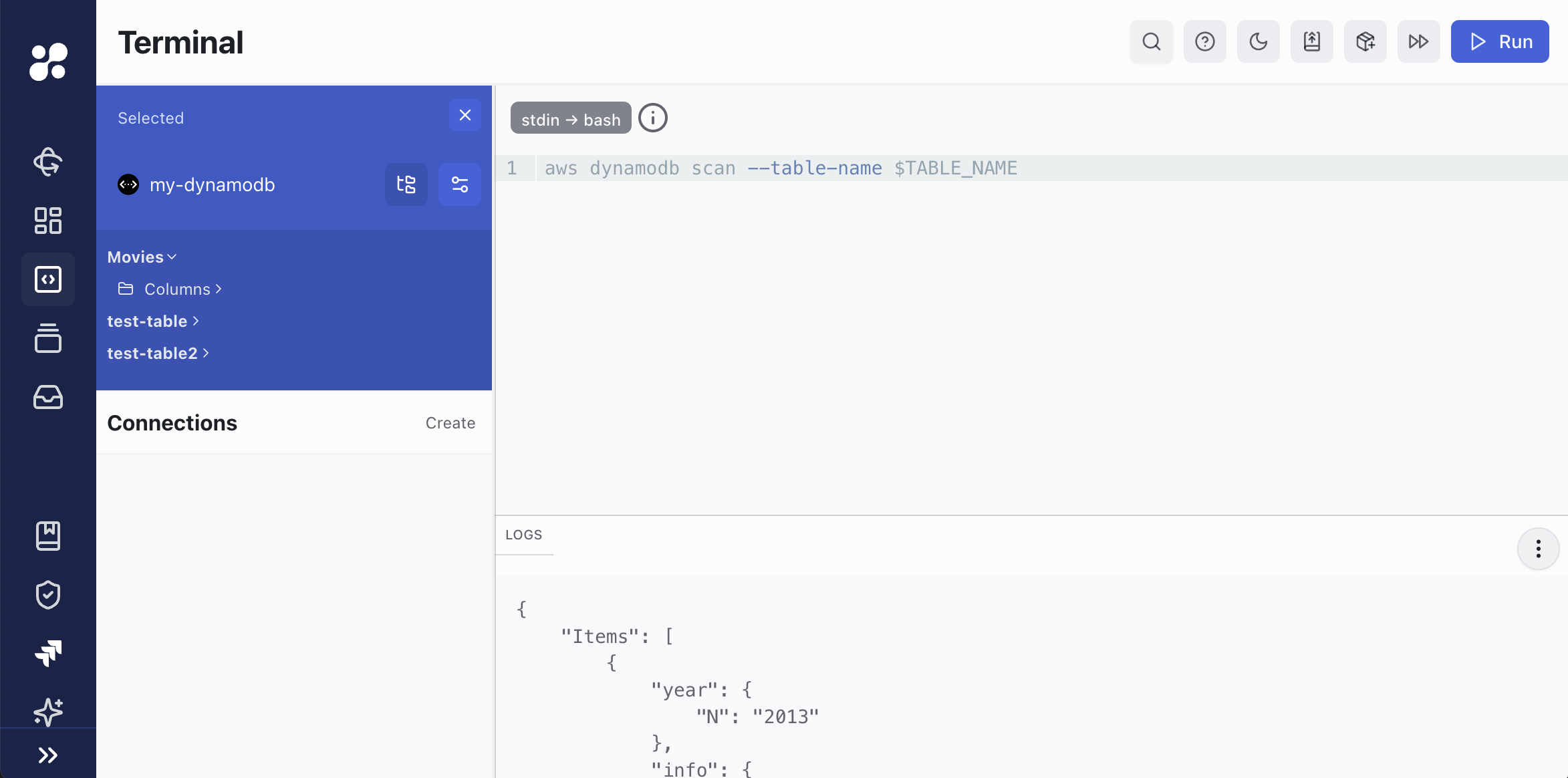
When you select a table in the interface, the terminal will propagate the name asTABLE_NAME environment variable, allowing you to use it in your scripts.
The example above shows the variable being used in a script to scan the Movies table.